

Getting Started
Welcome to using the VR Teleoperation Device! This document guides you through the initial steps, including unboxing and connection, to prepare you for an immersive experience.
Unboxing
Section titled “Unboxing”After receiving the VR Teleoperation Device, follow the steps below to unbox it:
-
Inspect the packaging box to ensure it is intact.
-
Refer to the list below to ensure no parts are missing or damaged.
- Standard Configuration:
- 1 VR set (1 VR Headset, 1 Left Controller, 1 Right Controller)
- 1 VR Data Cable
- 1 Charging Plug
- 1 2-meter Type-C charging cable
- 1 8-meter Ethernet cable
- 1 Industrial PC (with accessories + USB/WiFi)
- 1 Keyboard & Mouse Set
- 1 Foot Pedal
- 1 Monitor
- 2 AA Batteries
- Optional Configuration (if applicable):
- Dexterous Hand: 1 Pair of Dexterous Hand Gloves, 2 Data Cables, 1 User Manual.
- Video Transmission Module: 1 Video Transmitter, 2 Disks, 2 Omnidirectional Shock‑Absorbing Antennas, 1 Ethernet Cable, 1 Female Power Connector, 1 3 m Power Adapter.
- Standard Configuration:
Connection
Section titled “Connection”After unboxing, connect the components as illustrated in the diagram below.
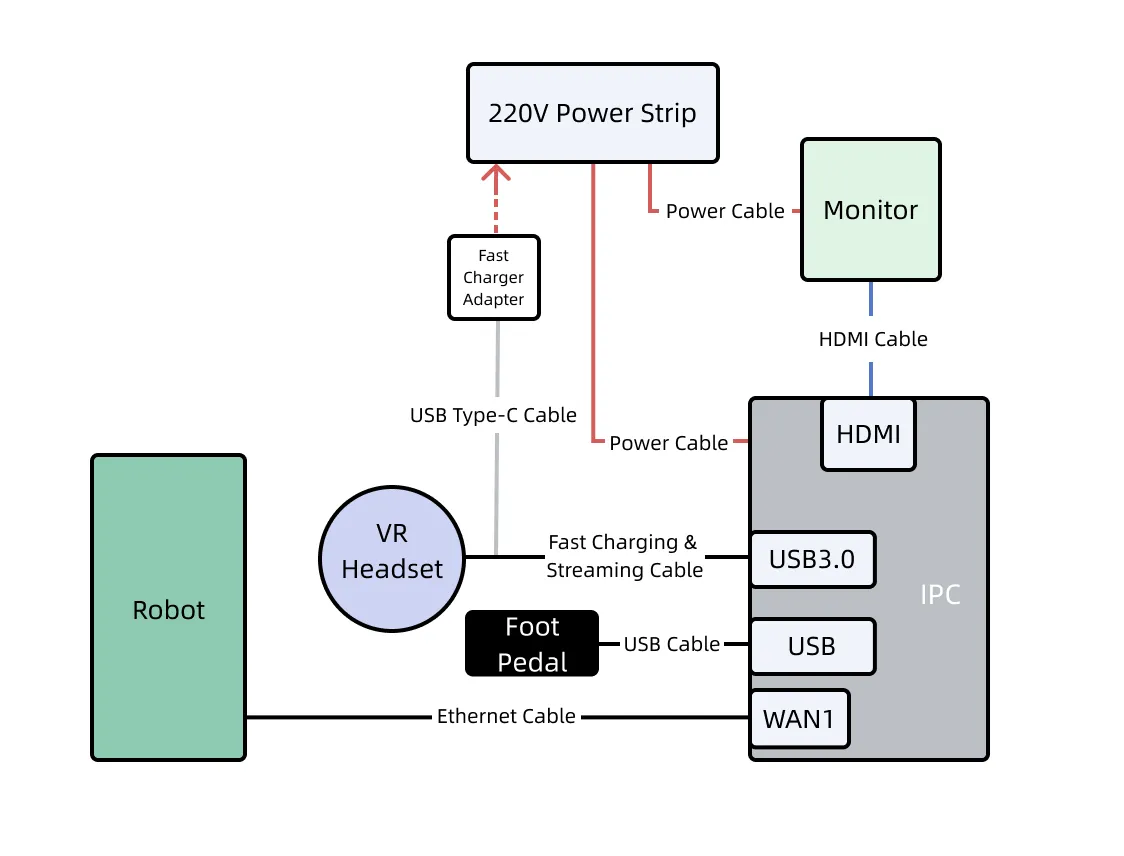
Next, please refer to the Product Introduction to learn more about the VR Teleoperation Device and its electrical characteristics, or skip to Common Operations to start using the VR Teleoperation Device to perform tasks.